
Document Management Systems (DMS) offer numerous benefits for organizations looking to streamline document-related processes. DMS store documents and data associated with documents (often called index values or properties) to facilitate functionality such as searching, business process automation and retention. DocuNECT can extend the capabilities of your existing on-premises or cloud DMS environment by adding Intelligent Document Capture (IDC) to ingest content from numerous sources and automatically separate, classify and extract the necessary data to populate the DM system property/index values.
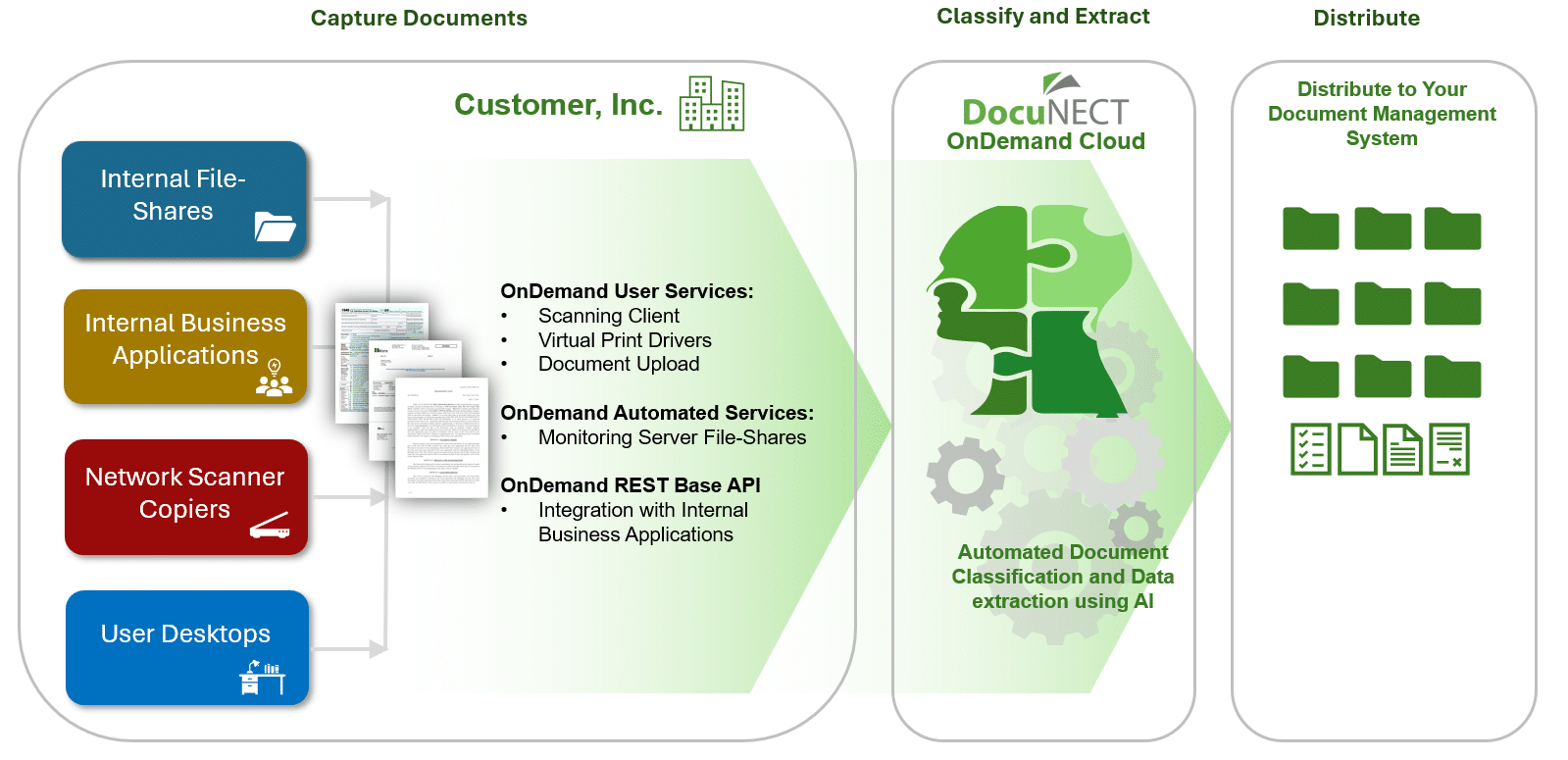
You Can:
- Upload documents from the desktop (Virtual Print Driver, Microsoft Office Integration) or via our DocuNECT OnDemand UI
- Scan documents from the desktop.
- Migrate documents from legacy document management systems.
- Import documents from third party source and business applications.
- Use DocuNECT’s powerful Discovery AI module to classify documents and identify and extract data.
From the Desktop
Capture documents from your desktop using DocuNECT OnDemand’s powerful client tools:
Features Include:
- Scan documents using a desktop or network scanner.
- Use the Virtual Print Driver (VPD) to add documents from any print-enabled application.
- Upload documents directly from Microsoft Office 365.
From External Feeds
You may receive electronic content with associated data stored in a format from vendors that need to be archived in your DMS. DocuNECT can be configured to import documents and index values that are supplied in a number of different formats.
Features Include:
- Total control over mapping the index values from any number of files sources, including databases, text files, JSON, XML and HTML files, and Microsoft Excel.
- Different sources can be periodically monitored looking for files to import, such as Local or Network Based File-Shares, FTP Sites, and Secure FTP/SSH sites.
- Email notifications can be sent to confirm successful file imports, or to notify a user of an import error.
From Central Email Inboxes
Email is still a highly used application for sending and receiving documents. DocuNECT allows you to set up an email address to be able to email documents directly into the DMS.
Features Include:
- DocuNECT can monitor traditional POP3 and IMAP protocols as well as Microsoft Office 365 email inboxes.
- The email body and attachments can either be added to as one document with multiple pages to represent the attachments, or the body and attachments can be added as separate documents.
- Information can be extracted from the email body and attachments to automate the indexing process. Tags can also be placed in the email body to populate index values.
Legacy File-Share Migration
Network based file-shares are a popular way to easily store and share documents. If you have already implemented a document management system, it makes sense to migrate the documents to leverage the investment.
Features Include:
- Map all or parts of the document’s name to DMS document index values.
- Map all or parts of the document’s folder name to the DMS document index values.
- Retrieve information from the content of the document to populate DMS document index values.
From Electronic Signature Platforms
Electronic Signature platforms manage every aspect of every transaction from preparing and sending documents to signing and managing them. DocuNECT can fetch and import the signed documents to provide a seamless workflow.
Features Include:
- Maps the meta-data received from the Electronic Signature platform to the DMS document index values.
- Email notifications to confirm imports have been successfully processed.
Statement/Report Management
DocuNECT can be used for ingesting different business reports and statements either in a text or PDF report, automatically extracting the report index values using business rules. DocuNECT can be used as a replacement for the legacy COLD or Report Management applications.
Tell Us About Your Project…
Complete the form below and one of our consultants will contact you to discuss your requirements in more detail:
Our Technology
Distribute Your Documents and Data To: